14 min read · 2,705 words
Vibe Coding isn't for Everyone Part 2
We’re again trying this experiment of an existential argument on Tuesday with a detail view with real world examples on Thursday - and today we’re going to dive into the actual code that’s generated by AI code gen tools, and how it requires some level of understanding and knowledge of code in order to implement and go live, and even then it’s not building enterprise grade tools, it’s building prototypes and internal tools at best, and just slop at worst.
Most of what I’m going to focus on today is code generated by Claude, because Claude and I are homies. And yes I say that somewhat jokingly, because Claude isn’t a person lol. In the parlance of our times with an homage to Battlestar Galactica - Claude is a clanker (I can’t wait till our AI overlords are running the world and I get “canceled” for calling them clankers lol - btw clankers gets autocorrected to flankers… which feels like a silly autocorrect. Just saying, computers never really KNOW what you’re trying to do or say lol).
Let’s not waste too much time, instead let’s just dive right into some of the key things that I want to call out…
- Creating context in AI development is most of the work you end up doing
- Understanding the way that systems interconnect and are set up is more than half the battle
- The last mile is the hardest mile, and AI isn’t capable enough to handle it
Time to rock.
Creating Context
Starting with just a basic observation - AI leverages large language models (LLMs) in order to make its “decisions”. One of the complicating factors of large language models is that they have SO MUCH information at their hands, that it makes understanding context difficult, because the AI could be pulling from anything at all and has to figure out what is and isn’t relevant.
This is exactly why you’re starting to hear more and more about small language models (SLMs) that are more industry focused, or knowledge base focused, or role focused. Because that limits the context, speeds up the decisioning, and also costs less to operate.
But, the tools I’m using aren’t SLMs they’re LLMs. So you gotta provide it the context that it needs and figure out exactly how it’s going to operate once you provide it goals and expectations.
For example, my first prompt in building my internal tool to track deals was the below:
I need to build a tool to track our pipeline of deals from ideation through valuation - we need it to be viewable either as a database view (tableview essentially) along with a swimlane view, and it needs to be able to be maintainable and follow all the rules in the attached documents — so i want to do a couple of steps here 1) i want to consolidate all of the requirements in the files and make it so that we have a set of prompts that can build out a fully fledged tool (backend and front end and database) 2) i want to build that tool in claude — can you start with step one of creating prompts to build out the entire tool based on the consolidated requirements and then we can move on to step two?
Included in this prompt was the product knowledge that was 3 different requirement docs that had some overlapping and some differentiated expectations. That being said it’s not realistic to expect the AI to quickly just understand these documents and then provide you code, because if you do it’ll spend time spinning it’s wheels without asking clarifying questions (unless it’s really unclear what’s in the docs) and then it’ll do things you’re not expecting.
So instead of just saying “let’s start building” it’s “what would you need as a prompt based on these requirements” and then it’ll build out steps and protocols so it’s got all the context that it needs in order to develop the code.
And with that, it created it’s own prompts then we started writing code based on those prompts, starting with just creating a basic application wrapper component:
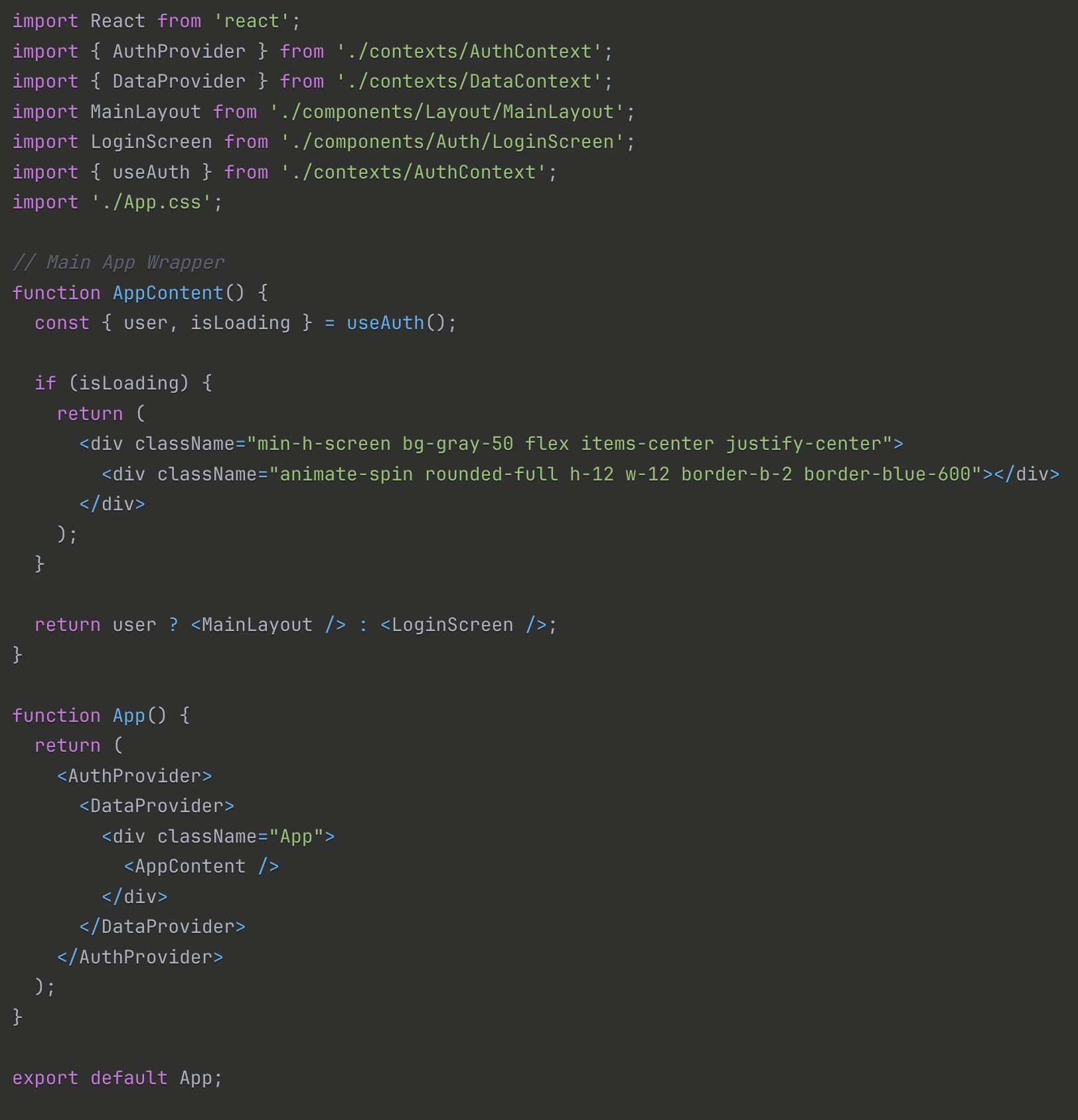
What’s funny looking at the code as a non-developer, is that it is already deciding what pieces of code it’s going to need to write in the future so it’s doing look aheads, that if you know what you’re doing you’d recognize, but if you’re just a novice or business person who hasn’t lived in code before you’d be like “wtf is this even doing” lol.
And yes, I realize if you’re a developer this is gonna seem like going back to kindergarten but that’s basically my skill level so I’m just going to walk through it. We start with importing all the core components that we’ll need in the application - we’re importing the react components, then we’re importing other files that don’t exist yet. You can see at the top the import functions with different files within different folders that we haven’t created yet. Whether it’s auth context, data context, layouts, whatever, it’s not something we’ve written but the AI knows that based on the prompts that we created together that it’s going to need them.
But let me reframe this because it’s not that it “knows” but it created a structure based on the context of seeing other applications and analyzing their structure as a part of the LLM. After it imports all these non-existent files (other than the react components, those are the only things we actually have at this point), it then builds the page and decides what needs to happen next.
Typically if you’re running a program, it’s going to run things sequentially or in an order that you define, but what’s weird about working with an AI code gen tool is that it’s not necessarily going to do anything in an order that makes sense to you — it’s just going to do what it thinks needs to happen at that moment because again, it’s lacking context.
In this case after building the main app component, it’s skipping the auth context, and going straight to data context, building out all our data models, then moving to placeholder components, literally writing code we’re going to get rid of later, just to build a structure. But why is it doing that? I don’t need to have placeholders, I’m not looking at this until we’re done… but a human developer WOULD build those placeholders to ensure that they’re setting up their views properly! So the AI does it because that’s the pattern that it’s seen repeated over and over again.
Now, the next piece of context that it was missing was, I’m working on a Mac. I started doing all the things it suggested, including using tailwindcss, but every time I tried to use it, it would fail. After doing some investigation and after we’d gone wait too far into the process… I realized that tailwindcss and Macs aren’t the best of friends lol.
This is what our initial page looked like (this is the best screenshot I could get because of how junky it looked):
We spent so many cycles going back and forth about how to solve it and what was wrong, and in the end it was just that tailwindcss didn’t import or install correctly. Because it’s annoying lol. But the code gen agent didn’t know I was on a Mac so it kept trying to push further and further on just plowing ahead and we couldn’t get something that was even moderately useful. We burned through so many tokens just trying to resolve it that we had to start a new chat, and then another new chat lol.

The thing is, you’ve all seen how these tools work… they’re INCREDIBLY confident and complimentary so all the while it’s building things that don’t really work and aren’t what you intended while telling you how perfect it’s going to be and how brilliant you are. It’s easy to get lost in it.
Even now, as I’m building new components within the project context and with a fully working app where we’ve repeatedly said we’re using bootstrap for css… it’s trying to add react-bootstrap components! Like I said, it’s making assumptions even with proper context included.
How Systems Interconnect
Again, for seasoned devs this is gonna sound basic lol. I’m sorry ya’ll. But just thinking about how all the programs on your computer work together is a complicated prospect that a lot of people who haven’t been living and breathing code would know about.
Even the AI tools often have no idea!
For instance, when we started building out our code… the first question is “where do you build these files” lol. So I built it on my user folder in my Mac! After about an hour of developing together, Claude realized… it doesn’t have access to that folder lol — so then we had to move it to the desktop. At which point, Claude forgot that we moved it to the desktop!
And then how do we manage all these files! That’s where your IDE comes in - I’m using VS Code, and the point of an IDE is 1) to organize your files for your project 2) to create some level of optimization (code completion tools, extensions, blah blah) 3) connect to your repo so you can upload your changes easily.
Now, Claude kept wanting to use terminal commands, which is totally fine, but it also feels… a little like you’re working in the past? Command line tools are incredibly powerful and can provide all sorts of easy solutions to complex problems… but they require a level of institutional knowledge and flat out memorization that I don’t think that you’d find a lot of business people understanding.
Why does npm do things? What’s the difference between npm and npx? And what’s this az function? What on EARTH is any of this stuff lol.
But the point is that every time I wanted to start a new conversation Claude had to go start rooting around in our chats then rooting around in my file structure and then it would have to recreate all the context around everything we’d just done. And, to make matters worse, some of the time the Claude you’re talking to is smarter than the the last one, and sometimes it’s dumber! And there’s no real predicting which version you’ll get. It’s almost like needing to call into Verizon or Comcast, and calling back over and over again until you get that one rep that knows all the ins and outs and can get you the greatest deal… but you have to limit the number of questions you can ask them to figure it out because if you ask too many questions the system will hang up and you have to try again.
Just now, I had to start a conversation over again, and said “Look at our last conversation and pick up where we left off.” And guess what it did? Tried to start from the VERY BEGINNING of our last conversation instead.
On the one hand, it’s annoying but not something you can’t overcome. But on the other hand, each one of these requests costs money to run, and requires energy that likely will boil our planet alive. So I’d rather NOT have to keep going 10 rounds to just get back to the context that we had… but even if I provided that context again… it’s gotta burn cycles relearning!
Again, even now, after Claude and I have been slaving away creating new pieces of our app then deploying it to azure… it forgets that we already have an app live in azure and wants to start all over every time. If you don’t know that it’s doing that and you don’t understand how all these systems connect, you’d just keep creating new artifacts over and over again and creating a ton of waste and confusion for anyone trying to review your code in the future!
The Last Mile
Which leads us to the last mile problem.
We often joke in the developer world that when creating an app 90% of the work only takes 50% of the time, and the last 10% of the work takes the other 50%. And the reason is that it’s complicated fucking work.
There are any number of little things that you could have innocuously introduced that completely screw up everything you’ve built. I was trying to just add code to a file and instead ended up borking my entire app and needing to go back and figure out everything I’d broken.
Even in the basic HTML app that we wrote for my kids schedule, I tried to add two divs to a table, and made the table completely unreadable. AND I KNOW HOW TO DO THAT ONE BASIC THING! And that’s not even what we’re normally talking about in that last 10%!
Normally we’re talking about things like scaling services, or figuring out edge cases, or creating some complex logic that needs to be implemented but has to touch all corners of our code base.
But Claude or another code gen tool isn’t going to have all the context of everything that you need to make sure works and works well, and even when it does have that context it doesn’t have the permissions or the knowledge base to do it well. It can write a yml for your deploy but it can’t connect to every desperate system that’s needed to ensure that the deploy worked properly, and it’s not qualified to test it to validate if it’s working as you expected because again… it’s not going to have all the context stored in your head!
So even when we’re building out tools like the internal one I’m creating, I have to be humble enough to know that I’m for sure missing things (I’m not a developer and have no idea the pitfalls that I’m walking straight toward). I’d need someone who has experience and has gone through the motions to understand where the pitfalls might be and spot them in advance, or know enough to fall in them then get themselves back out of them.
So putting a tool like this in the hands of a business person with a healthy ego (ahem, hello everyone) is a scary proposition! Because they’re going to THINK that they have everything solved when they don’t! Hell, as I’m building this tool I’m getting all sorts of dopamine hits every time something works and telling myself “you’re so goddamn smart you could do ANYTHING” while there’s a nagging voice in the back of my head from every developer I’ve ever worked with laughing at my ignorance.
The point of all of this is to say that we need to be more cognizant of what technology is and what it isn’t. It’s not magic. It’s not sentient. It’s not caring. It’s a tool. Just like a pulley or a lever.
Used correctly, it can make difficult tasks very easy. If you’re a developer and you know exactly how you like your projects structured and can write prompts to build out all the mundane bullshit, that’s SO COOL. But you’re probably not going to trust it with the complex logic that you need to get the app to work properly, or to deploy it for you, or to do the last mile work that you know is coming.
Because used incorrectly, tools can create chaos and mayhem. And while we all want life to be easier, and want to make ourselves do more… sometimes the best bet isn’t to go as fast as possible. And it’s not to create so much efficiency in your system that you forget the value it’s creating.
In the end the point of all these tools is the same as the point of the lever and pulley - to make life better for PEOPLE. And once we start losing sight of that and thinking that they’re tools anyone can use for any purpose, we lose the humanity and lose the plot.